Version history
Every change to a guide's steps keeps the previous version, so you can look back and restore one without losing what you have now.
Each time a guide’s steps change, SimplifyGuide keeps a copy of how they were before. If a rewrite, a re-recording or a round of edits goes wrong, you can put an earlier version back.
Opening it
In the editor, press Version history above the steps.
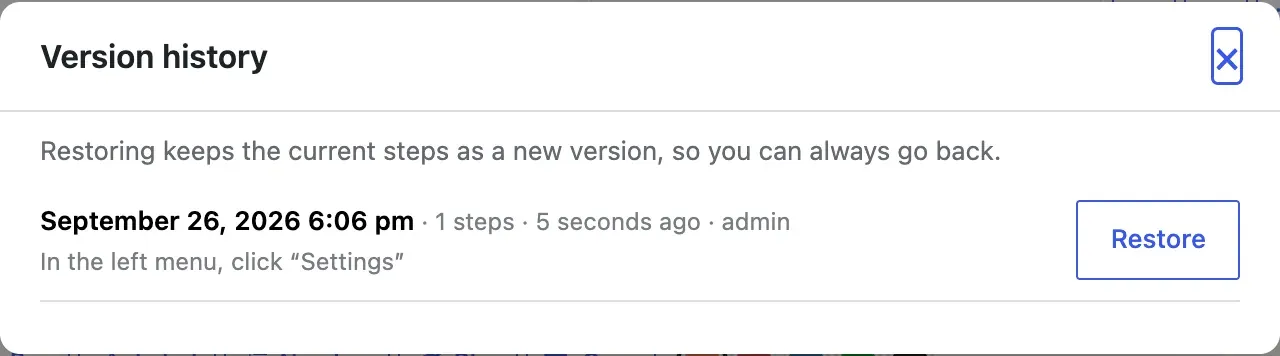
Each version shows:
- When it was saved, as a date and time and as ”… ago”.
- How many steps it had.
- Who made the change that replaced it.
- The first five step titles, joined by arrows, so you can recognise it.
The newest version is at the top. On a guide that has never changed, the dialog says No earlier versions yet. A version is kept every time the steps change.
Restoring a version
- Open Version history.
- Find the version you want and press Restore.
- If you have unsaved changes in the editor, you are asked to confirm — restoring discards them.
The version is put back immediately; you do not need to press Update. A notice confirms which version was restored.
Before it restores, SimplifyGuide saves the current steps as a new version. So a restore is never a dead end: if you picked the wrong one, open Version history again and restore the version at the top.
When a version is kept
A version is kept whenever the stored steps change: pressing Update after editing, recording more steps, an AI rewrite on Finish, a transcription, a blur or a crop. Saving without changing any step does not create one.
Recording adds steps one at a time, so to avoid a version for every click, changes by the same person less than a minute apart are folded into one.
What is kept
- The steps — instructions, notes, source badges, highlights, annotations, and which screenshot each step uses.
- Up to 20 versions. Past that, the oldest is dropped.
- Up to 1 MB of history per guide. If the versions add up to more than that, the oldest are dropped until they fit. The most recent version is always kept.
What is not kept:
- The page context captured while recording for AI rewrite. It is stripped from saved versions, which keeps them small. A restored step still works in the guide and in Show me, but Write this step from the recording has less to go on.
- The guide’s title, description and who sees it. Version history covers the steps only.
- Screenshots themselves. A version records which image each step used, not a copy of it. Blur and Crop replace the image and delete the original, so an older version cannot bring back an unblurred or uncropped screenshot — that step shows no screenshot instead. The same applies to an image you deleted from the Media Library.
Who can use it
Anyone who can edit the guide can see its history and restore a version.