The Overview page
Your SimplifyGuide home screen — guide counts, a getting-started checklist, recent guides and a summary of how the plugin is set up.
SimplifyGuide → Overview is the first item in the menu and the place to start each session. It is shown to authors only; readers go straight to the Help Center.
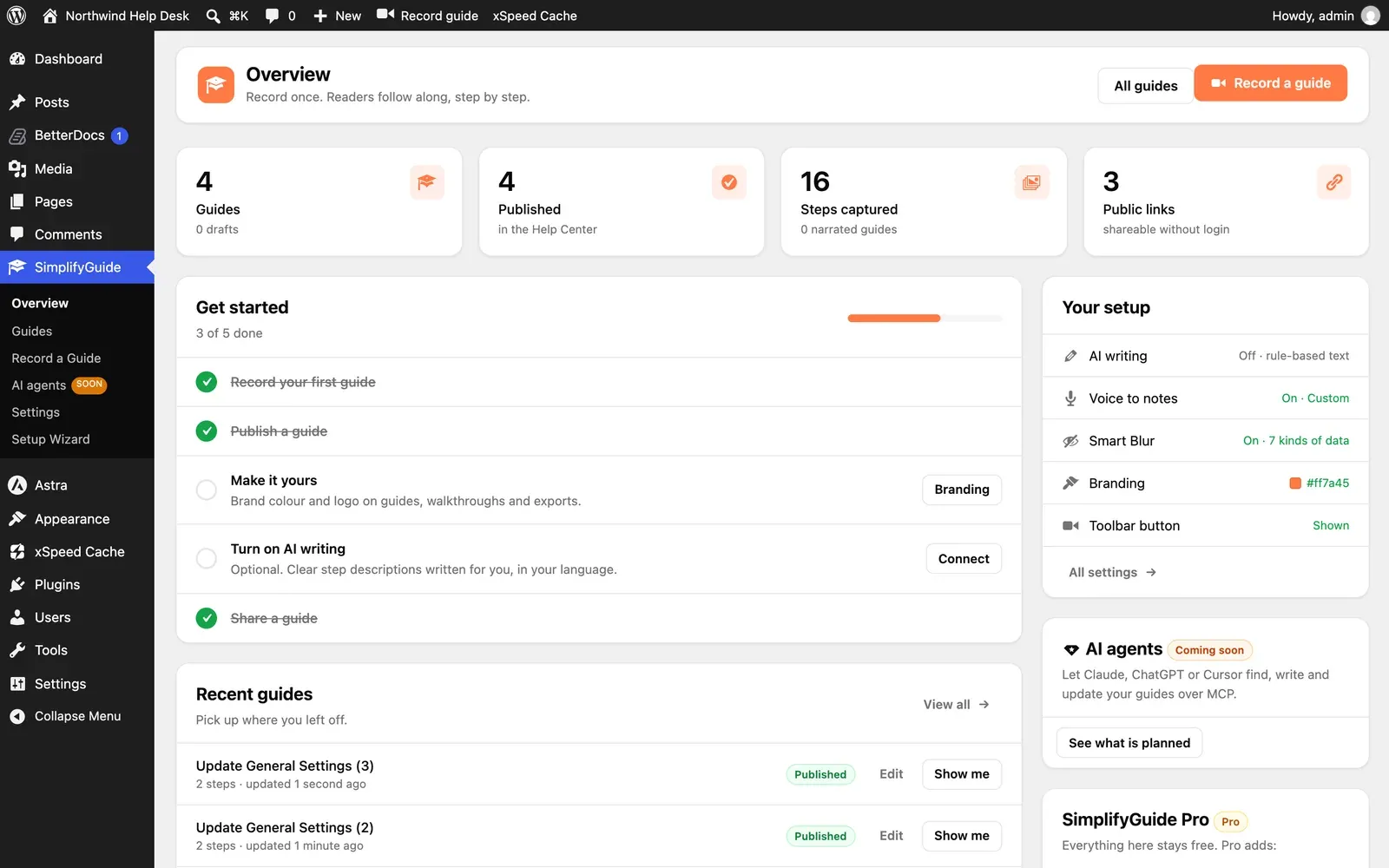
The header has All guides, which opens the Guides dashboard, and Record a guide.
If you are an administrator and have not finished the setup wizard, a Finish setting up banner sits under the header with Open the setup wizard.
Stat cards
| Card | Counts | Underneath |
|---|---|---|
| Guides | Every guide on the site: published, drafts, pending and private | How many are drafts or pending |
| Published | Published guides | “in the Help Center” |
| Steps captured | Steps across all guides | How many guides have narration |
| Public links | Guides marked Public | “shareable without login” |
Public links counts the Public setting, not where the guide is embedded. See Public guides.
Get started
A checklist worked out from what already exists on your site. Each item ticks itself off; you cannot tick them by hand. The card shows how many are done and disappears once they all are.
| Item | Done when | Button |
|---|---|---|
| Record your first guide | Any guide exists | Record |
| Publish a guide | Any guide is published | Open guides |
| Make it yours | The brand colour has been changed or a logo added | Branding |
| Turn on AI writing | An AI provider is ready to use | Connect |
| Share a guide | Any guide is marked Public | Share |
Make it yours and Turn on AI writing are only listed for administrators, since only they can change settings.
Recent guides
The five most recently changed guides, drafts included, each with its step count, when it was updated, Edit (if you can edit it) and Show me (if it has steps). View all opens the Guides dashboard.
Your setup
Administrators only. A summary of the settings that matter most, each linking to where it is changed:
| Row | Shows |
|---|---|
| AI writing | On and the provider, or Off · rule-based text |
| Voice to notes | On and the transcription provider, or Recording only |
| Smart Blur | On and how many kinds of data it hides, or Off |
| Branding | The brand colour, and logo if one is set |
| Toolbar button | Whether Record guide is Shown or Hidden in the toolbar |
All settings opens Settings.
AI agents
Administrators only. Connecting AI assistants such as Claude, ChatGPT or Cursor to your guides over MCP is planned, and this card is marked Coming soon. See what is planned opens the AI agents page, which describes it. Nothing on that page can be turned on yet. See AI agents and MCP.
SimplifyGuide Pro
Shown while Pro is not installed. Everything in the free plugin stays free; the card lists what Pro adds and links to Learn about Pro.
Help
Along the bottom: Documentation, Need help?, Suggest a feature and Enjoying SimplifyGuide?, each opening in a new tab.