Roles and capabilities
Who can record, edit, publish, use AI, change settings and read guides in SimplifyGuide, and how to change it.
SimplifyGuide uses ordinary WordPress capabilities, so your existing roles — and any role editor plugin you already use — decide who can do what. Guides behave like posts: people edit their own, Editors edit everyone’s.
At a glance
| Action | Capability | Default roles |
|---|---|---|
| Record and create guides | edit_posts (filterable) | Contributor, Author, Editor, Administrator |
| Upload screenshots and narration, import guides | the above plus upload_files | Author, Editor, Administrator |
| Edit or delete a guide | edit_post / delete_post on that guide | Its author; Editors and Administrators for any guide |
| Publish a guide | publish_posts | Author, Editor, Administrator |
| Use AI writing and transcription | publish_posts (filterable) | Author, Editor, Administrator |
| Settings, Setup Wizard, AI agents page | manage_options | Administrator |
| Check or reveal AI keys | manage_options | Administrator |
| Read guides in the Help Center | logged in, and in the guide’s audience | Everyone, by default |
Recording and authoring
Anyone with edit_posts can open SimplifyGuide → Record a Guide, see the
Record guide toolbar button, and create and edit their own guides.
Screenshots and narration are Media Library uploads, so they also need
upload_files. That makes Author the practical minimum: a Contributor can
record steps, but the screenshots and narration cannot be saved.
Change who can author with the simplifyguide_author_capability filter:
// Only Editors and Administrators may record guides.
add_filter( 'simplifyguide_author_capability', function () {
	return 'edit_others_posts';
} );
The filter controls the recorder, the toolbar button, the Overview screen and guide creation over the REST API. Editing a particular guide still follows WordPress’s normal post rules.
Publishing
A guide goes live when it is published. Publishing needs publish_posts. A
user without it can build a guide and save it as a draft for someone else to
publish.
Drafts are visible only to people who can edit them.
Using AI
AI calls cost the site owner money, so they need publish_posts — Authors and
above — rather than edit_posts. Users below that still record normally; their
steps are written by SimplifyGuide’s rules and their narration is saved as
audio without being transcribed.
// Only Editors and Administrators may spend AI credits.
add_filter( 'simplifyguide_ai_capability', function () {
	return 'edit_others_posts';
} );
Each user is also limited to 60 AI requests an hour; see AI providers.
Managing settings
Settings, Setup Wizard and the AI agents preview are for
Administrators (manage_options). So is choosing providers, saving keys, and
checking or revealing a key.
Reading guides
Who can read a published guide is set per guide, in the Who sees this guide box in the editor.
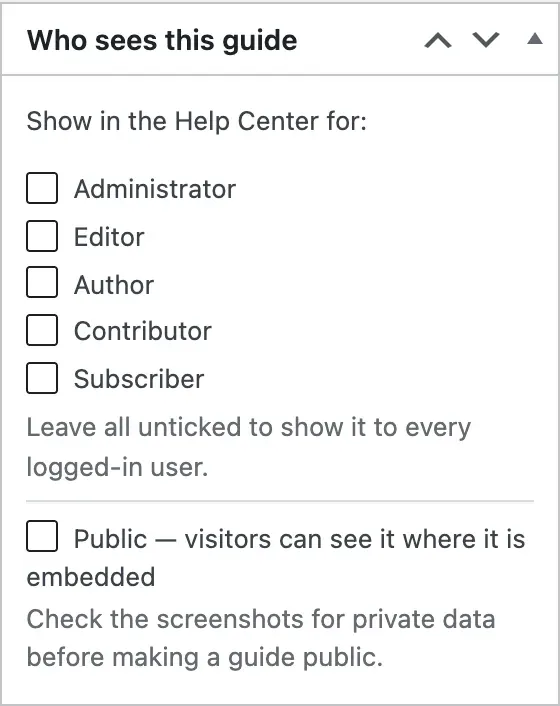
| Setting | Who can read it |
|---|---|
| No roles ticked | Everyone who is logged in |
| Some roles ticked | Logged-in users with one of those roles |
| Public on | Also logged-out visitors, wherever the guide is embedded |
People who can edit a guide can always read it, whatever its audience.
New guides start with the roles chosen under Settings → General → New guides are shown to. The default is none ticked, meaning every logged-in user. The setup wizard offers three shortcuts for this: everyone, Editors and Administrators only, or roles you pick.
Public does not create a page on its own. Guides have no front-end URL; a public guide is visible to visitors only where you embed it with the block or shortcode. See Embed and Public links.
The same check applies everywhere a guide can be read — the Help Center, Show me, embeds, Markdown and HTML downloads, and the REST API. Readers who cannot edit a guide never receive its recorded page context.
The readers’ Help Center menu
Authors see a SimplifyGuide menu with everything in it. Everyone else sees a Help Center menu near the top of the admin sidebar, listing the guides they can read, with Show me on each.
Readers who cannot see any guide get no menu at all, so the plugin stays out of the way of people it has nothing for. The dashboard Help Center widget follows the same rule and lists up to eight guides.
See Help Center.